
 |
Custom Interface |
 |
Non-rectangular interface with rounded corners [More] |
To download this demo for your Linux/Mac installation, enter this on your command line:
DreamDownload byond://PopLava.CustomInterface##version=1 Emulator users, in the BYOND pager go to File | Open Location and enter this URL:byond://PopLava.CustomInterface##version=1 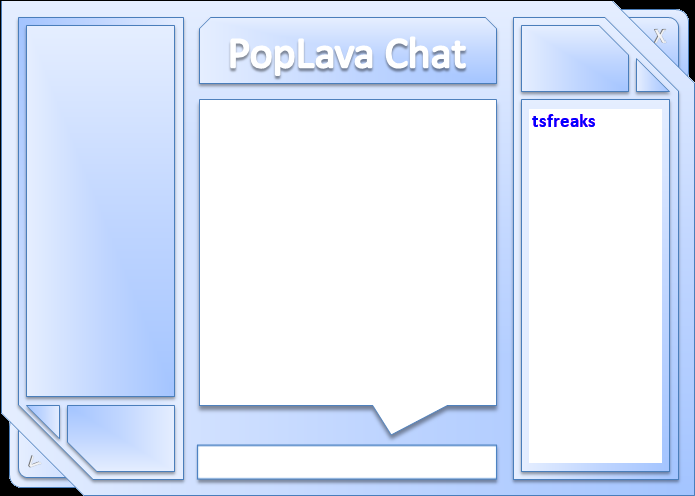 |
WARNING: Using transparency like this will force windows into software rendering mode which can impact performance.
IMPORTANT: Transparency behavior in Windows is inconsistent depending on the version of windows and the selected theme. Transparency doesn't work when something like the Aero theme is enabled. This essentially blocks the use of transparency in our apps and games because we can't provide the visual effect consistently without asking the user to disable the Aero theme. A demo which shows how to use a large image to create a non-rectangular interface with transparency. In this example, I used PowerPoint to create the main interface background. I took a screenshot of it and pasted into mspaint where I added the transparent color (pink). Then I applied it as a background image and modified the windows transparent color to be pink as well. With the background image applied, I just overlayed a couple tweaked controls in the appropriate places. While this demo shows some neat rounded effects, you can get as crazy as you want with your interfaces. 2/20/2012 - v1.1 - Cleaned up source code a little bit. |
Nadrew: (Apr 3 2012, 7:34 pm)
Should definitely be noted that doing this will force your game to run in software rendering mode instead of hardware rendering mode -- which can cause a ton of slow-down for certain clients.
Hiro the Dragon King: (Apr 3 2012, 7:29 pm)
This is a very nice demonstration, and a nice interface design, as well. You can also use this concept with map elements, allowing for a "jagged" interface that is also animated.
Kaiochao: (Mar 15 2012, 3:32 am)
It's just an image. Use whatever image you want, in the shape of whatever you want, and fill the clear part with pink.
Avainer1: (Mar 15 2012, 1:55 am)
Do you think you'll at some point be able to produce a circular interface?
|


Copyright © 2024 BYOND Software.
All rights reserved.