ID:92875
 Mar 14 2010, 8:41 am
|
|||||||
| |||||||
It would be cool if BYOND had support for shaders; think of all the graphical effects that could be added!
| |||||||
|
Mar 14 2010, 12:58 pm
|
|
Falacy
 |
What kind of Shaders?
|
Falacy wrote:
What kind of Shaders? I was thinking you could program them directly in HLSL, so DirectX could handle them directly (they could probably be post processed, too). | |
The moral of my story was, what are shaders gonna do in 2d? Make sprites glow? And/or couldn't you already do it with alpha transparencies?
| |
Falacy wrote:
The moral of my story was, what are shaders gonna do in 2d? Make sprites glow? And/or couldn't you already do it with alpha transparencies? You can add tons of effects, like sepia, black and white, glow (more of a "flashbang"-like effect), etc. | |
Falacy wrote:
The moral of my story was, what are shaders gonna do in 2d? Make sprites glow? And/or couldn't you already do it with alpha transparencies? Firstly alpha transparency is very slow, also it doesn't look as good as shader ones, also to make exactly that with shader, you probably would need to modify rendering process. I think Jeff had in mind only postprocess shaders you only need to supply final frame to shader, so postprocess it, also some might need previous frame, but having all types of shaders would be very nice. Possible post process uses: With post process shaders it's possible to change colors, to black and white, sepia, negative or just dissort them randomly (like swap RGB channels to GRB). Could be used when player is drunk, stunned, confused, is wearing glasses and etc. Also it's possible to add Bloom, HDR and other similar effects, they might look really good on games which use lightning, lights, shadows, reflections or just have scenes with high difference in scene lightness. Blur, Motion Blur, Radian Blur and other Blur types are also post process, these mostly can use used to show speed or etc. It basically makes bright places even brighter, would look nice with some skills/spells (kamehame or etc XD) Lens, Lens Flare and etc when looking at sun, also it can zoom in image with minimal quality loss. Lets say you are looking at sun, or near to the sun. Also using edge detection, bloom and radial blur shaders, it's possible to make 'glow' around each wall/player/tree on players screen, like it's some magical stuff, mysticism or etc. | |
Ripiz wrote:
Firstly alpha transparency is very slow lol if peoples computers have trouble processing alpha transparencies you think they'll be able to handle advanced shaders? There's probably a reason I haven't seen any of these shaders until the current gen of gaming... | |
Falacy wrote:
lol if peoples computers have trouble processing alpha transparencies you think they'll be able to handle advanced shaders? BYOND seems to use GDI/CPU rendering, not GPU, making whole screen alpha makes it lag =/ Actually, shaders nearly always were used, shadows are made using shaders, and nearly all games have shadows. Unless you could tell specific game, if you know any particular. Edit: Maybe it's only me, but I always have problems with BYONDs rendering performance, but I can run Crysis, Hellgate:London, Devil May Cry 4 and other games without any problems. | |
Ripiz wrote:
Actually, shaders nearly always were used, shadows are made using shaders, and nearly all games have shadows. Unless you could tell specific game, if you know any particular. Any games on the ps1, 90% of the games on the ps2? Probably some crapily graphiced ps3 games... Not to mention in all comparison I would put BYOND below the SNES, which obviously doesn't have any of these effects. Most of these effects didn't come into play until the PS3 era, and the earliest game I can really remember them on was Oblivion. http://www.gamedev.net/community/forums/ topic.asp?topic_id=256746 | |
Falacy wrote:
Most of these effects didn't come into play until the PS3 era, and the earliest game I can really remember them on was Oblivion. Are you trying to tell games before Oblivion didn't had shadows? That's false for sure. Not to mention Bump Mapping and other similar things. Shadows are made using shaders, and even before Oblivion games had bloom, HDR, (motion) blur and other effects, which all are made using shaders. There are Vertex Shaders and Pixel Shaders, they both are GPU specification, and all GPUs always had them even Pixel Shader 1 is shader, yes it's isn't as good as Pixel Shader 3 or even 5, but that's still shader, and it was used for shadows or other effects. | |
Ripiz wrote:
Are you trying to tell games before Oblivion didn't had shadows? That's false for sure. Not to mention Bump Mapping and other similar things. Show me a ps2 game that has dynamic shadows... or anything even close to bump mapping. There are Vertex Shaders and Pixel Shaders, they both are GPU specification, and all GPUs always had them[...] If you read that link I posted it states that the ps2 doesn't have pixel shaders. | |
I never had PS1 PS2 neither PS3 or XBOX so I'll have to use GameSpot...
These two look like bloom to me http://www.gamespot.com/ps2/action/gta4/images/0/ 2/?tag=thumbs_below;thumb;2 http://www.gamespot.com/ps2/action/gta4/images/0/ 5/?tag=thumbs_below;thumb;5 Depth of field: http://www.gamespot.com/ps2/rpg/finalfantasy12/images/0/ 7/?tag=thumbs_below;thumb;7 http://www.gamespot.com/ps2/action/ dragonballzbudokaitenkaichi3/images/0/ 8/?tag=thumbs_below;thumb;8 Saber glow and shadows on ground: http://www.gamespot.com/ps2/action/starwarsbattlefront2/ images/0/1/?om_act=convert&om_clk=gsimage&tag=images;img;1 Shadows can be made using CPU, not only Shaders, but it's slower, and less possibilities, but shaders can be ran on CPU too, all the difference, Shader has direct access to memory, and current GPUs have many microprocessors, so they perform way better than CPU, which has to use motherboard to get one pixel on texture, and etc. | |
As I'm not familiar with the use of shaders outside of the context of 3D, you'll have to clarify that. Without 3D support I don't see how this would be feasible.
| |


I think what may be getting requested here is more "filters" than "shaders"
Which just happen to be reffered to as "next-gen filters". Several PS3 games have options for them (which is partially what I was referring to when you posted "With post process shaders it's possible to change colors, to black and white, sepia, negative or just dissort them randomly") like RE5 and Uncharted 2 for example. Depth of field and bloom exist in a few ps2 games, MGS3 for example, which was pretty much a highpoint of ps2 graphics. How does that relate to BYOND though? Dynamic lighting/shadows in 2d would be... confusing to work with, to say the least. Though maybe more applicable in ISO. Ripiz wrote: Saber glow and shadows on ground: Not sure about the shadows there. They could just be pre-rendered textures that are cast off the models for the quality they're at. But they could be dynamic *shrug*. As you can see though, they don't exactly look like it. As for that light saber "glow" that's nothing you couldn't already duplicate with alpha trans. That light saber isn't exactly casting the shadows like it should be, nor is it casting a green glow on the characters or surrounding area. | |

Shadows, and Bump Mapping are 3D shaders, all post-process shaders are 2D, as they take final picture and change it.
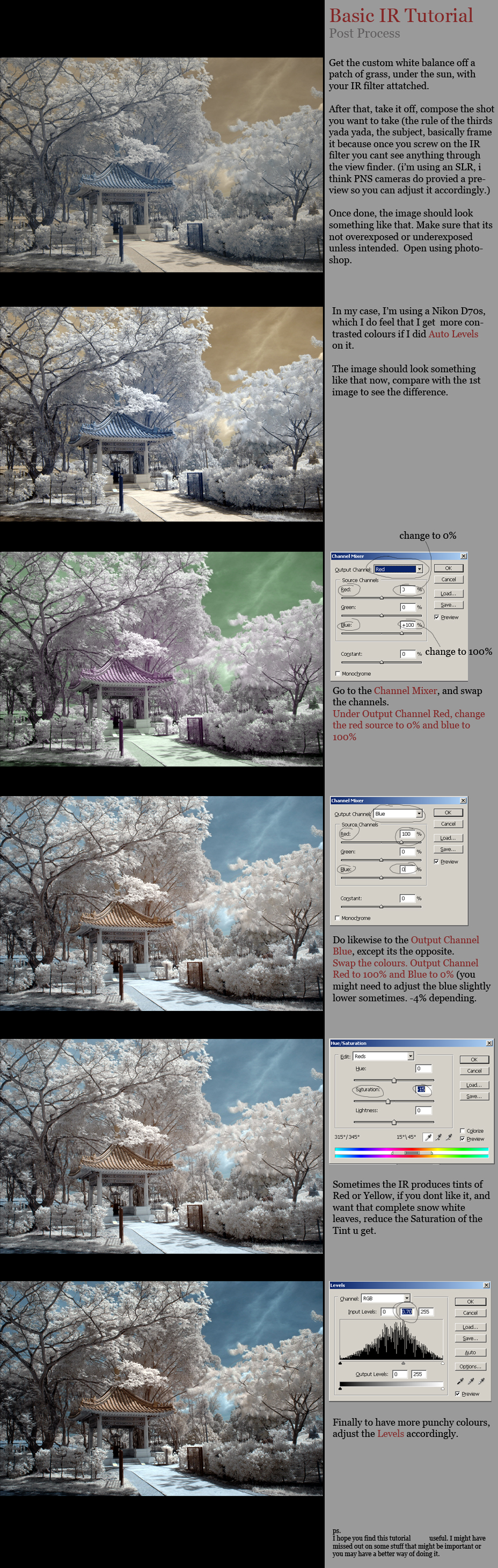
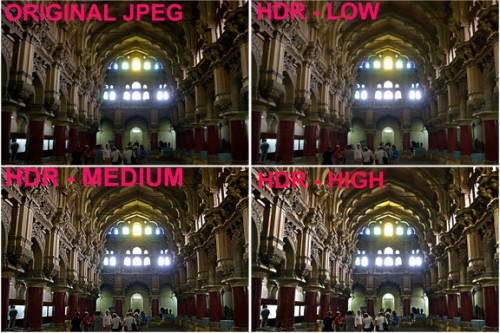
Something like could can be achieved using shaders: http://fc02.deviantart.com/fs21/f/2007/278/b/3/ Basic_IR_Post_Process_by_log1t3ch.jpg Other examples: http://fc01.deviantart.net/fs47/f/2009/218/d/9/ Post_Processing_Example_1_by_P0RG.png http://static.photo.net/attachments/bboard/00U/ 00UQ4u-170435784.jpg http://www.photocrati.com/wp-content/uploads/2009/11/ Q_hdr_Examples-500x333.jpg Two bloom examples, this can be done in 2D too: http://upload.wikimedia.org/wikipedia/en/9/9a/ HrdiBloomExample.jpg http://upload.wikimedia.org/wikipedia/commons/d/d4/ Elephants_Dream_-_Emo_and_Proog.jpg This post is more like a guide, but shows what postprocess shader can do: http://www.truevision3d.com/forums/announcements/ hlsl_post_process_shaders_for_newbies-t18745.0.html I still have DirectX post process examples, Just a min, I'll upload images somewhere | |




Anyway, wouldn't all of this require full client-sided graphic processing?
| |
Falacy wrote:
Anyway, wouldn't all of this require full client-sided graphic processing? No, client side already does most of needed for this - draw everything. Post process takes final image (like screenshot) sends it to shader, and executes supplied code. If BYOND uses default render target, then you might need to create extra surface and texture, then copy backbuffer to this surface, so you get final image on the texture variable, then send it to shader. //I'll use my Radial Blur post process as example, done using DirectX 9 Only difference, you'd probably need to make array to hold shaders on clients side, then use them when needed, not all the time. I think that's all the code you will need to make it work (except loading it from .rsc, and handling new packets as well as coding in DM). | |
Lummox JR wrote:
As I'm not familiar with the use of shaders outside of the context of 3D, you'll have to clarify that. Without 3D support I don't see how this would be feasible. SFML is a free, opensource 2D library that uses OpenGL and makes use of post processed shaders (they're called post effects in the library). | |
Falacy wrote:
Anyway, wouldn't all of this require full client-sided graphic processing? No, shaders are a part of DirectX, so BYOND could just consider HLSL files resources and have DirectX run them. | |
BYOND only needs few extra commands in it's language, so we can load Shaders, and run our own Techniques, instead of need to match them to specific pattern.
Edit: Lummox JR wrote: As I'm not familiar with the use of shaders outside of the context of 3D, you'll have to clarify that. Without 3D support I don't see how this would be feasible. Shaders such as Shadows, Pixel Motion Blur, Bump Mapping and others apply to 3D objects in space, while Post Processing effects take only 2D image, the final scene, BYOND has it, so it won't be any problem to add support just to that. | |